Posts for January 2026

Get notifications from Claude Code on Windows with WSL

My ~/.claude/settings.json with full solution

I've been looking for a way to get notified when Claude Code needs my input or is finished. Big shout out to u/Ok-Engineering2612 on Reddit for this post:  WSL Toast Notifications with Hooks in Claude Code : r/ClaudeAI. I had been trying to do the same thing with BurntToast but I forget the way WSL interops with Windows.

The settings from the Reddit thread did need a little tweaking ($PAYLOAD is no longer supported and now Claude Code sends the JSON structure via stdin). Here's my change to the command:

 "command": "input=$(cat) && powershell.exe -NoProfile -Command \"Import-Module BurntToast; New-BurntToastNotification -Text 'Claude Code Notification', '$(echo \"$input\" | jq -r '.message')'\""
Here is the full documentation for hooks: Hooks reference
# / 2026 / 01 / 09

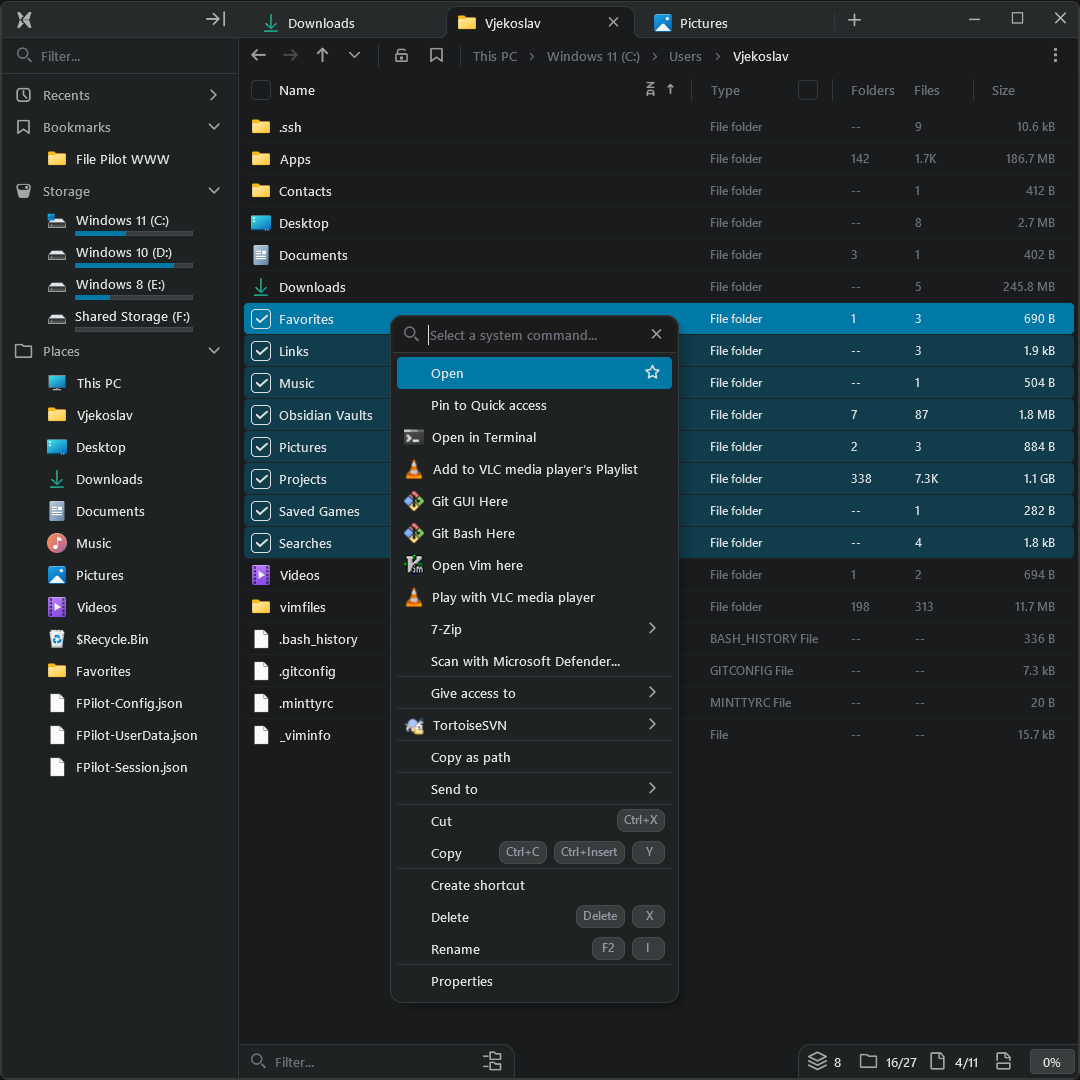
File Pilot - Fast file explorer for Windows

File Pilot

It’s 2026 and you can buy a lightweight, super fast file explorer for windows for $250. I kind of love it.

The price obviously seems really high for a file explorer, but apparently it’s taken the developer 3 years to get to this point. You can also pay $50 but that only gets you a years worth of updates.

This project has got me thinking about an alternate reality where you have to pay for basic features of the OS. What if each program like notepad, paint, or task manager were priced this way? Or worse you had to pay a subscription! I’m actually shocked we didn’t end up in this world. Thankfully nerds write software for the love of the game and give it away. This puts downward pressure on the bugs corps to not nickel and dime software. All that said, I’m happy the file pilot dev values their own work and has priced this tool accordingly. If nothing else, I think it shows the windows team how software should run (fast) with few dependencies.

Screenshot
# / 2026 / 01 / 07

Setting up a dotnet dev environment with WSL and Ubuntu 24.04

I just knew 2026 was going to start off this way... A complicated setup to do something that should be simple.

Ok, so you want to do some .NET dev work with WSL? Better not choose Ubuntu 24.04 as your distro. I guess this version doesn't ship with some important packages that are needed to make some interop work between Windows and Linux. Anyways, let's get to the steps!

Configure Git for authentication with Azure DevOps 
  1. Make sure you have installed Git For Windows on your host machine. Your git installed in Linux will need to use the credential manager in Windows.
  2. Configure the credential helper: git config --global credential.helper "/mnt/c/Program\ Files/Git/mingw64/bin/git-credential-manager.exe"
  3. Configure using HTTP: git config --global credential.https://dev.azure.com.useHttpPath true
  4. Clone a repo hosted in Azure DevOps
Install Dotnet
  1. Install dotnet: wget https://dot.net/v1/dotnet-install.sh -O dotnet-install.sh && chmod +x ./dotnet-install.sh && ./dotnet-install.sh --jsonfile global.json
  2. Edit ~/.bashrc to add dotnet to the PATH
export DOTNET_ROOT=$HOME/.dotnet
export PATH=$PATH:$DOTNET_ROOT:$DOTNET_ROOT/tools
 Configure dotnet for authentication with Azure DevOps
  1. Install Artifacts CredProvider: wget -qO- https://aka.ms/install-artifacts-credprovider.sh | bash
  2. Set environment variable in ~/.bashrc to force a dialog to popup for authentication so you don't end up using Device Flow (which some tenants, like mine, disallow)
export NUGET_CREDENTIALPROVIDER_FORCE_CANSHOWDIALOG_TO=true
Install packages that allow the browser to be opened from MSAL
This part is crucial. When you run dotnet restore --interactive, MSAL will want to open your system's browser so you can use OAuth to sign in and provide credentials for your Azure DevOps instance. Install these packages, which no longer ship with Ubuntu:
  1. apt update
  2. apt install xdg-utils
  3. apt install wslu
wslu is a discontinued project that consisted of utilities for WSL and xdg-open is a program that will open the system's browser.

Edit: If WSL interop stops working
You may need to add a WSL interop config (source)
sudo vim /usr/lib/binfmt.d/WSLInterop.conf
Add this line:
:WSLInterop:M::MZ::/init:PF
Then, restart systemd-binfmt
sudo systemctl restart systemd-binfmt 
Final step
dotnet restore --interactive
This should open your browser and you can sign in and restore packages! This only took me a full morning to figure out :(

me in 2026

Microsoft Loves Linux - Microsoft Windows Server Blog 
# / 2026 / 01 / 05

GIFs!

I added GIF support today. And now that I have to go back to work tomorrow, I’ll be using this one multiple times a day again

Elmo Fire
# / 2026 / 01 / 04

LLMs - unexpected side effects

Simon Willison on helping people write code again

+1 to what Simon is saying. I’ve been able to do a lot more on side projects now especially as a busy parent. I will kick off a prompt on Claude code (on my phone sometimes with Claude code web) and then go back to playing with my daughter or cooking or dishes. I can prototype ideas I have and look at the results whenever I have time. It’s really made me fall in love with programming again! I just wish I could find a better workflow for it at work. I’m struggling to get out of the “small toy projects” phase and into using it on larger projects. Probably less of a me problem and more of a tech / organization problem. 
# / 2026 / 01 / 04